3ERP / Manufacturing interaction
One HTML tag. A part people can explore.
How Nuo Pixel Solutions built a reusable Stencil and Three.js component for 3ERP, bringing deferred STL/OBJ previews and interactive part inspection into manufacturing websites.
Nuo Pixel Solutions · Engineering by Mayank · Since 2015
01 / Engineering detail
The project: make complex parts easier to understand
A manufactured part is difficult to explain through one static image. Its depth, openings, internal relationships and orientation can be unclear, especially when the viewer is evaluating a complex component for CNC machining, 3D printing or sheet metal fabrication. For 3ERP, Nuo Pixel Solutions wrote a reusable Stencil component powered by Three.js so a website visitor could interact with a three-dimensional model instead of relying only on a fixed camera view.
The component was designed for embedding through an HTML tag, with rendering deferred rather than making every page pay the graphics cost immediately. That combination addresses both the user experience and the integration problem: offer a useful interaction while keeping the host website responsible for the surrounding content and workflow.
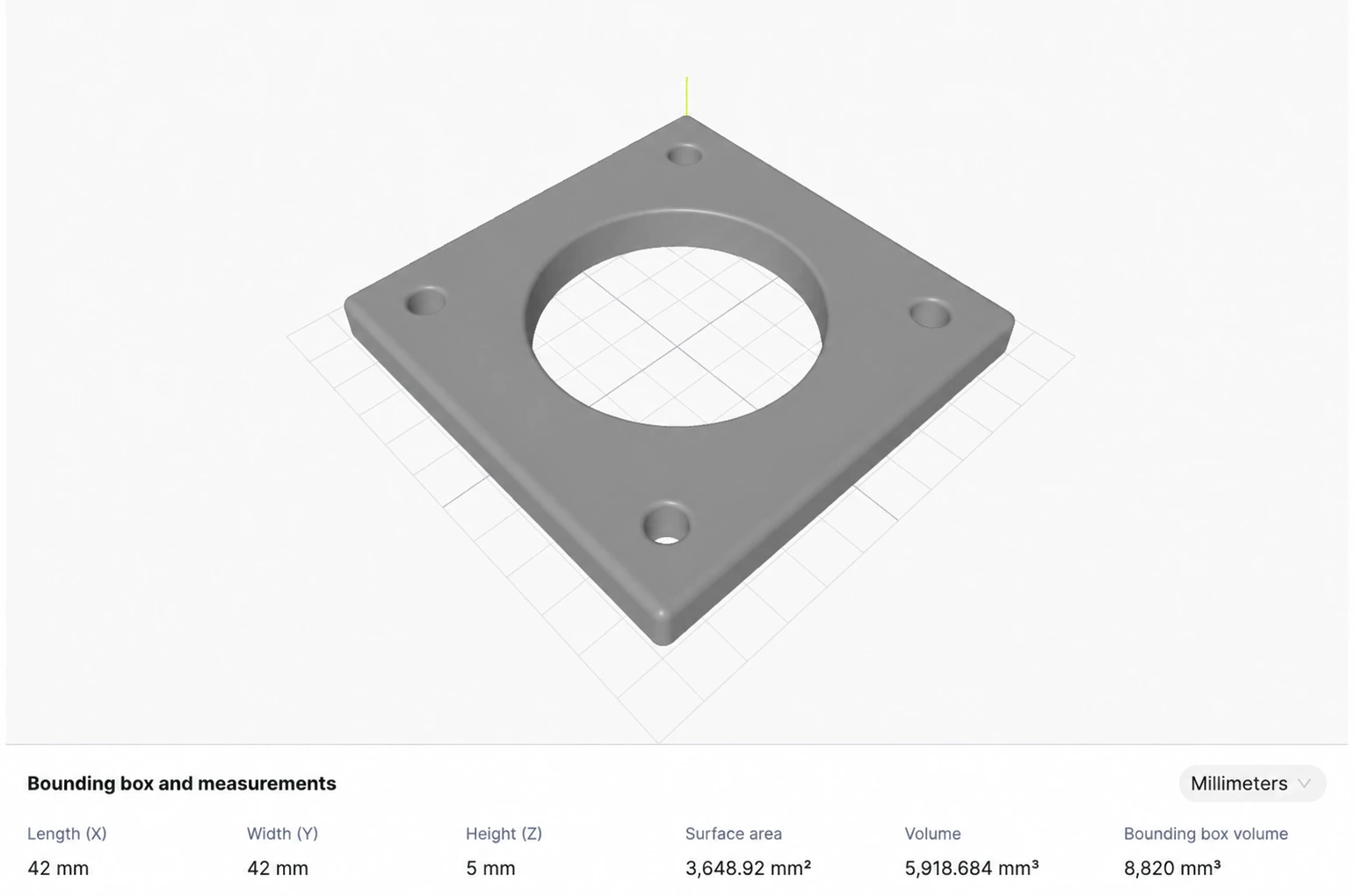
This case explains that project approach. The interactive example on this page is a new, self-contained demonstration of the pattern, not a copy of 3ERP’s private production source or CAD files. The gray reference image is a recolored version of the supplied project preview. Its displayed measurements belong to that reference; the sample model’s estimates are calculated separately.
Try the interactive 3D preview
This recreated sample demonstrates the interaction pattern. Your STL/OBJ files stay in this browser; no file is uploaded.
02 / Engineering detail
The interaction has a specific job
The visitor needs to understand the part’s visible form. Orbiting the camera can reveal an opening hidden from the original angle. Zooming can expose a small feature. Resetting the view gives the visitor a dependable way back after experimenting. Those actions make the experience feel tangible without requiring desktop CAD software or an account simply to inspect an example.
For a manufacturing website, this can also demonstrate technical fluency. A visitor can see how the company presents complex geometry and can explore the part at their own pace. That is a useful contribution to a conversation about a project, but it is not evidence of a measured conversion increase. We do not attach an invented revenue or inquiry statistic to this work.
The preview also has a boundary. It displays geometry; it does not automatically establish that a part is manufacturable, that tolerances are achievable or that a quoted price is valid. CNC machining, additive manufacturing and sheet metal fabrication each require process-specific checks. A clear interface helps users inspect a model without implying that the viewer replaces those engineering decisions.
The project preview, in gray
03 / Engineering detail
Why a Stencil web component fits this problem
The embedding goal was straightforward: provide a reusable interface that can be placed on a website or application through a custom element. Stencil is suited to building web components, allowing the feature to have a defined tag and a controlled public interface. The host page can include the component without reproducing its rendering code in every template.
The practical benefit is a stable boundary. The host supplies the model and presentation context; the component handles loading, scene setup, camera interaction and its own state. That separation is valuable when a feature needs to appear in more than one part of a website or across different frontend environments.
Framework independence still requires normal integration work. The component bundle must be registered, asset URLs must resolve, and the host’s security and styling rules must allow the intended behavior. “One tag” describes the embedding interface after registration, not a claim that no JavaScript or deployment setup is needed. Our demonstration uses an actual compiled Stencil component to make that distinction concrete.
Illustrative host integration
<script type="module" src="/components/viewer.esm.js"></script>
<part-preview src="/parts/example.stl" color="gray"></part-preview>
Illustrative API only. These tag names, URLs and attributes are not the client’s private production contract. The working demo on this page is a separately registered Stencil component.
04 / Engineering detail
Three.js turns mesh data into an inspectable scene
Three.js supplies the graphics layer: a scene, camera, renderer, lights and materials. Loaders interpret supported model formats, and the resulting geometry is presented through a controlled camera view. This keeps file interpretation separate from the surrounding interface and lets the component offer consistent controls around different meshes.
The sample viewer applies a neutral gray material to make the shape the focus. Lighting provides depth cues, while a restrained grid helps communicate orientation. The purpose is readable geometry rather than a photorealistic material claim. The gray finish does not identify an actual alloy, surface treatment or manufacturing process.
In a product implementation, scene setup should follow the model’s bounds rather than assume every part has the same dimensions. A very small part and a large assembly need different camera distances and clipping ranges. Automatic framing should leave useful space around the object and provide a reliable reset. These are practical design considerations for a reusable viewer, not simply cosmetic adjustments.
05 / Engineering detail
STL and OBJ support have different constraints
The project brief identifies STL and OBJ previews. Both can carry mesh geometry, but a viewer needs to treat their loading paths explicitly. STL represents triangulated surface data; OBJ can describe grouped mesh data and may refer to separate material resources. A public preview should define which of those capabilities it accepts instead of promising every variation of every file.
The demonstration accepts local STL and OBJ files and applies its own gray material. It does not fetch external textures or material libraries from a selected OBJ. Files are read in the browser, with an 8 MB input limit and a triangle limit appropriate to this small public example. Those are demonstration limits, not reported limits of the 3ERP production component.
Mesh files also require validation. An empty mesh, invalid coordinates or excessive complexity should produce an understandable error rather than a blank canvas. Parsing a file successfully is not the same as validating its engineering quality. Open surfaces, duplicated faces and other mesh issues can still make physical calculations unreliable.
06 / Engineering detail
Deferred rendering protects the surrounding page
A 3D feature can consume network bandwidth, CPU time and GPU memory before the user interacts with it. Deferring the expensive work gives the page a chance to present its main content first. The confirmed 3ERP approach included deferred rendering; the exact private scheduling mechanism is not reproduced here.
In this demonstration, the user explicitly selects Load 3D preview. The lightweight component presents the controls and status area first; Three.js and the loaders are imported when the preview is requested. This makes the cost visible and avoids creating a WebGL renderer for a visitor who only wants to read the case study.
A production strategy could instead combine viewport visibility with user intent, depending on where the viewer appears. The important point is to distinguish registering the component, downloading the graphics code, fetching the model and creating the scene. Deferring one of those stages does not automatically defer all the others. A review should inspect actual requests and initialization behavior rather than rely on a loading label.
07 / Engineering detail
Render when the view changes
A static part does not need an animation loop to redraw an identical frame indefinitely. The sample uses change-driven rendering: camera interaction, model changes, resizing and control actions request a frame. That keeps the interaction responsive without making an idle scene continuously animate.
The renderer also needs a deliberate pixel-density policy. Rendering at an unrestricted device pixel ratio can make a small viewer expensive on a high-density display. The demonstration caps that ratio and resizes the renderer to its container. This is a practical tradeoff for a public example, not a measured performance claim about every device.
Resource lifetime matters as much as initial loading. When a component is removed, event listeners, observers, controls, geometries, materials and the graphics context should be released as appropriate. Changing the model should dispose of the old scene resources. A reusable component must behave predictably when a host application navigates between views, not only when it is loaded once on a blank page.
08 / Engineering detail
Interaction needs an accessible alternative to dragging
Dragging is intuitive for many visitors, but it should not be the only way to explore a part. The demonstration includes labeled rotation, tilt, zoom and reset buttons, alongside the orbit interaction. These controls make the feature easier to discover and provide a keyboard-operable path for the main actions.
Status messages distinguish loading, a ready preview and a failed request or unsupported graphics context. A blank viewport should never be the only error signal. The article and reference image remain useful even when a device cannot initialize WebGL. That fallback is part of the experience, not an afterthought to the graphics code.
On touch devices, the interaction also has to coexist with page scrolling. The viewer occupies a defined region, and controls remain outside the canvas so a visitor can choose how to interact. Motion is user-driven rather than a forced continuous rotation. A prospective client can inspect the part at their own pace and return to a stable view when needed.
09 / Engineering detail
Dimensions are only meaningful with a unit contract
The supplied reference includes bounding-box dimensions, surface area and volume. Those values should not be confused with the new sample geometry on this page. The demonstration reports its own bounding-box estimates and triangle count. It assumes the input coordinates represent millimeters and can display a conversion to inches.
That assumption is explicit because a mesh coordinate is not automatically a trustworthy physical unit. A production integration needs a defined unit contract between the uploaded model, the backend metadata and the viewer. A label such as millimeters cannot repair an incorrectly scaled source file.
Volume and surface-area calculations introduce further conditions. A closed, consistently oriented mesh can support calculations that an open or malformed mesh cannot. The public demo therefore avoids presenting a physical volume result as verified engineering data. Bounding dimensions help explain the preview, but they are not a tolerance report, material calculation or manufacturing approval.
10 / Engineering detail
Embedding in a wider manufacturing journey
The custom element can sit beside a capability explanation, a part example or an inquiry workflow. Its role is to support understanding without taking over the page. A useful integration provides context: what the visitor is looking at, which interactions are available and what action makes sense after inspection.
For a quotation journey, the preview could be one step among file selection, process requirements, material details and human review. The case does not claim that this component alone implemented those systems. Nuo Pixel Solutions’ broader capabilities include manufacturing RFQ and instant-quote workflows, but the confirmed scope here is the reusable interactive preview.
A component interface should also make state observable to the host. A production contract might expose loading, ready and error events, or allow a host to replace the model through a property. Exact production tag names, attributes and event payloads are not supplied, so the code examples here are labeled as illustrative. The principle is a stable integration boundary rather than a dependency on one page’s markup.
11 / Engineering detail
Testing the component as a reusable feature
A meaningful review tests more than whether the first sample appears. It should include valid STL and OBJ files, an empty or malformed input, different model scales and a failed fetch. The camera should frame the part consistently, controls should remain usable after a model change, and the interface should explain what went wrong when a file cannot be displayed.
Lifecycle tests are important in applications. Mount the component, remove it and mount it again; confirm that resources and handlers do not accumulate. Resize the container rather than only the browser window. Test a device without a usable graphics context and verify that the fallback remains understandable.
These are appropriate validation criteria for this kind of feature. The public demonstration is tested against its own behavior; it is not an audit of the private 3ERP codebase. Keeping that distinction clear lets a prospective client evaluate both the confirmed project approach and a working example without mistaking recreated source for an actual client repository.
12 / Engineering detail
What this work demonstrates
The 3ERP project brings together interface design, web-component engineering and browser graphics. Its value is the combination: a useful interaction for complex parts, a reusable HTML embedding boundary and a loading strategy that considers the rest of the page. A polished model on an isolated demo page would address only part of that problem.
For a business planning a similar feature, discovery should establish model formats, typical complexity, unit metadata, hosting restrictions and the pages or applications that need the viewer. It should also define what the feature must not imply, especially where visual inspection sits near a manufacturing or pricing decision.
Nuo Pixel Solutions can connect that component work with UI/UX design, custom application development, APIs, manufacturing workflows, deployment and maintenance. Since 2015, our focus has included moving from early concepts to production systems. This case shows a specific example of that capability: turning a complex technical object into an interaction people can understand and use.
13 / Engineering detail
Technical references
Stencil’s documentation explains custom-element integration and its distribution options. Three.js documents its mesh loaders and orbit controls. These references support the platform concepts discussed here; they do not disclose the client’s private implementation. The registered demo tag and example integration are specific to this website.
Practical questions
Frequently asked questions
Can the viewer be embedded with an HTML tag?
Yes, after registering the component bundle. The host still needs valid asset URLs and a compatible browser environment. The example tag on this page is our public demonstration interface.
Does the gray part show a real material specification?
No. Gray is a visualization material chosen to make geometry readable. It does not certify an alloy, coating or production finish.
Are visitor files uploaded in this demo?
No. Selected STL and OBJ files are parsed in the browser. This demonstration does not send them to a server or request external textures.
Does a preview prove that a part can be manufactured?
No. Manufacturability, tolerances, process selection and quotation require separate checks. This component provides interactive visual inspection.
From concept to production
Build a useful component into your next application.
Tell us about the users, platform and technical constraints. We can connect UI/UX design, frontend engineering, backend development, APIs, deployment and ongoing maintenance around a clear product requirement.