A launch checklist becomes useful when a checked item means something specific happened. Without that discipline, a page of green ticks can hide assumptions: somebody thought the form was tested, somebody expected the backup to exist, and everybody believed another person had reviewed the live destination.
The Nuo Pixel Solutions launch readiness checker is a manual review tool. It does not scan a website or independently certify that a launch is safe. It records your checks, saves their states in the current browser when storage is available, and creates a plain-text review you can keep with the release.
Use the tool alongside the fuller launch guide. The guide explains what to investigate; the checker gives the team a compact place to record the review. Its value depends on the evidence behind the boxes and the clarity of the responsibilities around them.
Understand what the tool does and does not verify
The workbench presents a defined set of review statements covering scope, content, navigation, forms, accessibility checks, downloads, environment, backups, and post-publication ownership. Selecting a checkbox records your own assertion that the relevant check has been completed.
The tool does not open your hosting account, submit your contact form, inspect credentials, or compare a release with production. A completed count means the reviewer recorded the items as checked. It must not be described as an automated audit score or proof that the website meets every possible requirement.
This distinction is important when a review is shared. Keep the explanation with the exported checklist and add the release, environment, reviewer, and evidence in your project record. A plain count without that context can be misunderstood after the original conversation is forgotten.
Begin with one clearly identified release
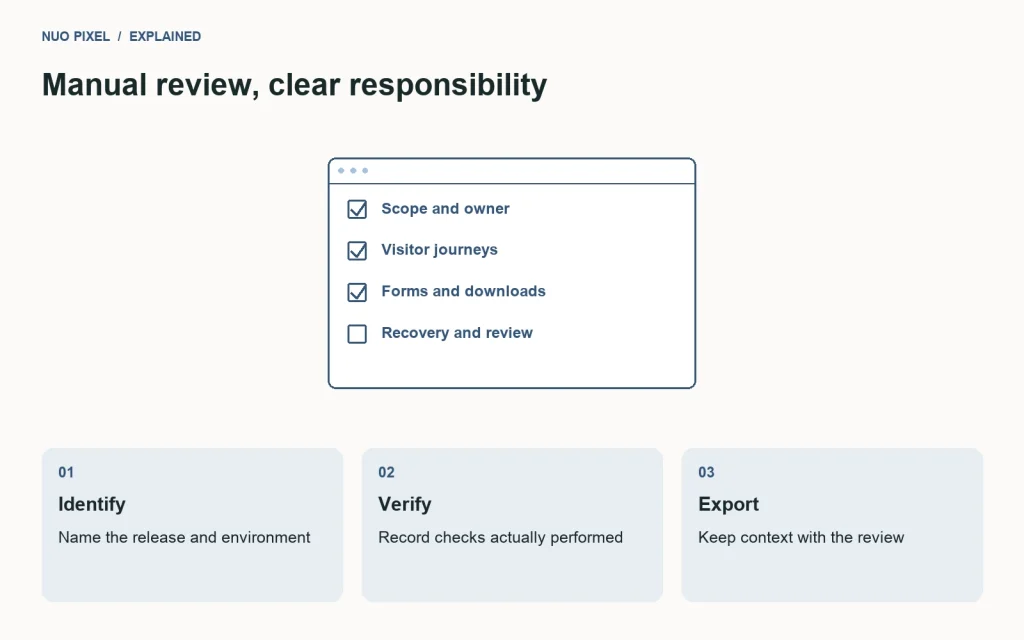
Decide which website and change set the review concerns. A checklist for an earlier local build should not quietly become evidence for a later live deployment. Record a release identifier or a clear description before you start checking the items.
Identify the environment. Local development, staging, and production can have different mail configuration, credentials, caching, runtime versions, and external integrations. A check performed in one environment may support part of the release decision without establishing the same behavior in another.
Assign a person who can make the launch decision and people who can verify specialized areas. The checklist does not require one reviewer to understand every dependency. It does require the team to know whose evidence supports a checked statement.
Keep unresolved issues beside the review. A checkbox is too simple to express every qualification. If an item has a known limitation, record it rather than using a tick to hide a condition that the decision maker needs to understand.
Record content approval as an actual review
The content items concern the business message, approved claims, contact information, and next step. Read the final rendered page rather than assuming the source document is identical. A copied placeholder or outdated phone number can survive a technically successful deployment.
Ask the person who owns the facts to verify them. A developer can check that an email link is correctly formed without knowing whether it reaches the business’s preferred address. An editor can improve a service explanation without having authority to invent a delivery guarantee.
For Nuo Pixel Solutions, this includes making sure brand references describe actual services and resources accurately. The name should be consistent, but the content should not rely on repeated brand phrases to appear complete. Specific explanations and useful examples carry more value.
Check downloadable documents and sample offers too. A fictional pricing specimen should remain labeled as fictional. A template with sample answers should not be presented as a real client brief. These distinctions are part of content accuracy, not merely optional footnotes.
Verify navigation through representative journeys
Open the homepage, a standard page, an article, an archive, a tool, and the contact route where they are part of the release. Follow actual links rather than testing only hand-entered addresses. The shared header should provide familiar identity and destinations across those page types.
At narrow width, open and close the menu, reach every link, and confirm the current section is identified sensibly. Use keyboard navigation as well as a pointer. Check enlarged text and any state where the menu becomes taller than the screen.
Follow related links and calls to action inside the content. A main navigation check does not cover the download button at the end of a long tutorial or a tool link inside a worked example. Include the routes most relevant to the new release.
Record the inspected routes with the review when it matters. “Navigation checked” can mean very different things to different people. A short route list makes the evidence repeatable and helps future releases avoid overlooking a less frequently visited template.
Treat forms as delivery workflows
A form check should include a controlled successful submission and relevant recoverable errors. Confirm the intended destination, preserve entered text after a correction, and verify that the page’s message reflects the actual outcome the system can establish.
Test validation failure separately from delivery failure. A missing email address and an unavailable mail service are different problems. The visitor should receive a useful explanation without losing a carefully written inquiry or being told a failed request succeeded.
Use an agreed safe test message and destination. Repeated unexplained tests can create noise for the people handling genuine inquiries. Keep the method and expected result with the maintenance record so another reviewer can repeat it appropriately.
Only check the item when the relevant evidence exists. Opening the form, clicking a disabled demonstration button, or reading the plugin’s settings screen does not by itself verify end-to-end delivery on the live website.
Review the checks that automation cannot settle alone
The checker includes headings, focus, image alternatives, and text enlargement as manual review areas. An automated report can support these tasks, but the team still needs to inspect the implemented experience and understand the content’s purpose.
Read the heading outline and try the main keyboard journey. Confirm that focus remains visible and that repeated navigation can be bypassed appropriately. Review image alternatives in context rather than assuming every image should receive the article title as its description.
Check narrow layouts with real content, including a long title, a form error, and a detailed diagram. A polished desktop specimen does not establish that labels remain readable or that controls remain reachable when the content changes.
Keep the scope honest. Completing these review items is useful evidence for the inspected experience. It is not a complete accessibility certification, and the workbench does not claim to replace any broader evaluation a particular project requires.
Check images, downloads, and tools by their outputs
Open the major images and inspect their intended crop and detail. Confirm that an explanatory diagram has not lost labels through a card-style crop. Check that images reserve appropriate space during loading when that affects nearby content and controls.
Download representative files and inspect their contents. A valid link can still deliver an older archive, an incomplete package, or a file whose extension does not match its actual format. The check concerns what the visitor receives, not only whether the server returned a response.
For a tool, use a normal input, an unsupported case, and an appropriate demanding case. Verify output dimensions, file type, and error behavior where relevant. A working demonstration with one small image does not establish every supported condition.
Retain useful specimens for future checks. The same controlled inputs can make a later update easier to review, provided their role and expected outcome are documented. Add cases when real issues reveal gaps instead of making the review set large without a purpose.
Confirm the environment and recovery arrangements
Identify the live domain and document root, runtime requirements, necessary components, and credentials that remain on the server. Check that local or staging origins have not leaked into published links. Verify redirects and not-found behavior when addresses changed.
Confirm a current private backup and a person who can use it. A backup notification alone does not prove recovery. Keep restoration instructions and record any dependencies needed beyond the archive, such as a runtime requirement or external service configuration.
Do not treat full database restoration as an unconditional undo button. Newer live activity may exist after the snapshot. Recovery should consider what changed and whether a targeted restoration can preserve subsequent data.
The readiness checker can record that the team reviewed these arrangements. It does not create backups, authorize access, or perform restoration. Those are separate operations that need appropriate implementation and review.
Understand browser storage and reset behavior
When browser storage is available, the workbench saves its checkbox states under its own local key. That helps a reviewer return to the same browser without losing the selection. It does not create a shared team record or synchronize with a hosting account.
A different browser or device can have different state. Clearing browser data can remove the record. In a restricted context where storage is unavailable, the tool can still show the current page’s checks, but the selection may not persist after leaving.
The reset action clears this checklist’s saved state and returns the boxes to unchecked. It does not delete a text file you previously downloaded or erase a review stored elsewhere. Keep that distinction clear when starting another release review.
Do not put sensitive information into the checkbox labels or treat browser storage as an approved repository for credentials. The tool’s predefined statements are intended to record review status, while detailed evidence belongs in an appropriate project record.
Export the review with enough context
Use the download action to create a plain-text list showing checked and unchecked items. Open the file and add the release, environment, reviewer, date, and evidence references before treating it as a durable record. The export reflects the selections, not an independent verification.
Keep unchecked items visible until they are resolved or deliberately accepted by the decision maker. Removing them from the document can make the release look more complete while hiding the information needed to judge it. A qualified decision is better than an artificially perfect checklist.
Distinguish a blocking issue from a follow-up. A broken inquiry journey, exposed private file, or incorrect commercial claim can matter differently from minor visual polish. Assign an owner and next step rather than letting every item disappear into a general list of things to improve later.
After publication, perform the agreed live checks and append the result to the record. A pre-release review and a successful deployment command do not eliminate the need to confirm the visitor’s actual journey on the destination.
Use the checklist to improve the next release
Review repeated omissions. If a download is often missed, add a clearer evidence reference to the workflow. If form delivery repeatedly fails after updates, strengthen the relevant release check rather than relying on memory. The checklist should support learning without becoming an unmanageable collection of every possible website issue.
Nuo Pixel Solutions can use the workbench to make review visible and repeatable while keeping the responsibility human. Somebody checks the behavior, records what they observed, and makes a decision with the remaining uncertainty in view.
The result is not confidence manufactured by a progress counter. It is a small record connecting a particular release with the checks actually performed. When those connections are clear, the tool helps a team launch more deliberately and makes the next maintenance conversation easier to understand.
Hand the review to someone who was not present
Before relying on the exported checklist, ask whether a colleague could understand it without attending the review session. They should be able to identify the release, the environment, the owner, and the evidence behind important items. If the document only contains ticks, add a short companion note with those references.
For example, a form item can refer to a controlled delivery test and its expected destination without including the message’s sensitive contents. A download item can identify the package version inspected. A navigation item can list the representative routes. These references make the review useful without turning the checklist into a large technical report.
Keep any remaining qualification visible. A checked local review and a pending live delivery check can coexist, but they should not be collapsed into one unqualified statement. Clear status helps the next person take the appropriate action instead of repeating work or assuming that a different environment has already been verified.
Resources for this guide
Need help applying this to a website? Discuss the project with Nuo Pixel Solutions.